Basics
Accounts & currencies
Track every place you keep money — cash, cards, savings, loans — in any currency.
An account in Flow represents a real-world container of money: a bank account, a wallet, a credit card, a savings jar, even a friend who owes you money. Every transaction you record belongs to exactly one account.
Account types
Flow supports six account types, each tuned for the way that container behaves:
- Checking — a regular bank or wallet balance you spend down. The default.
- Savings — a balance you mostly grow.
- Credit (e.g., card) — a credit card or other credit line.
- Loan — money you owe or are owed.
- Asset — a non-liquid store of value, like an investment account.
- Other — anything that doesn't fit the above.
ℹ️ Why the type matters
1. Create an account
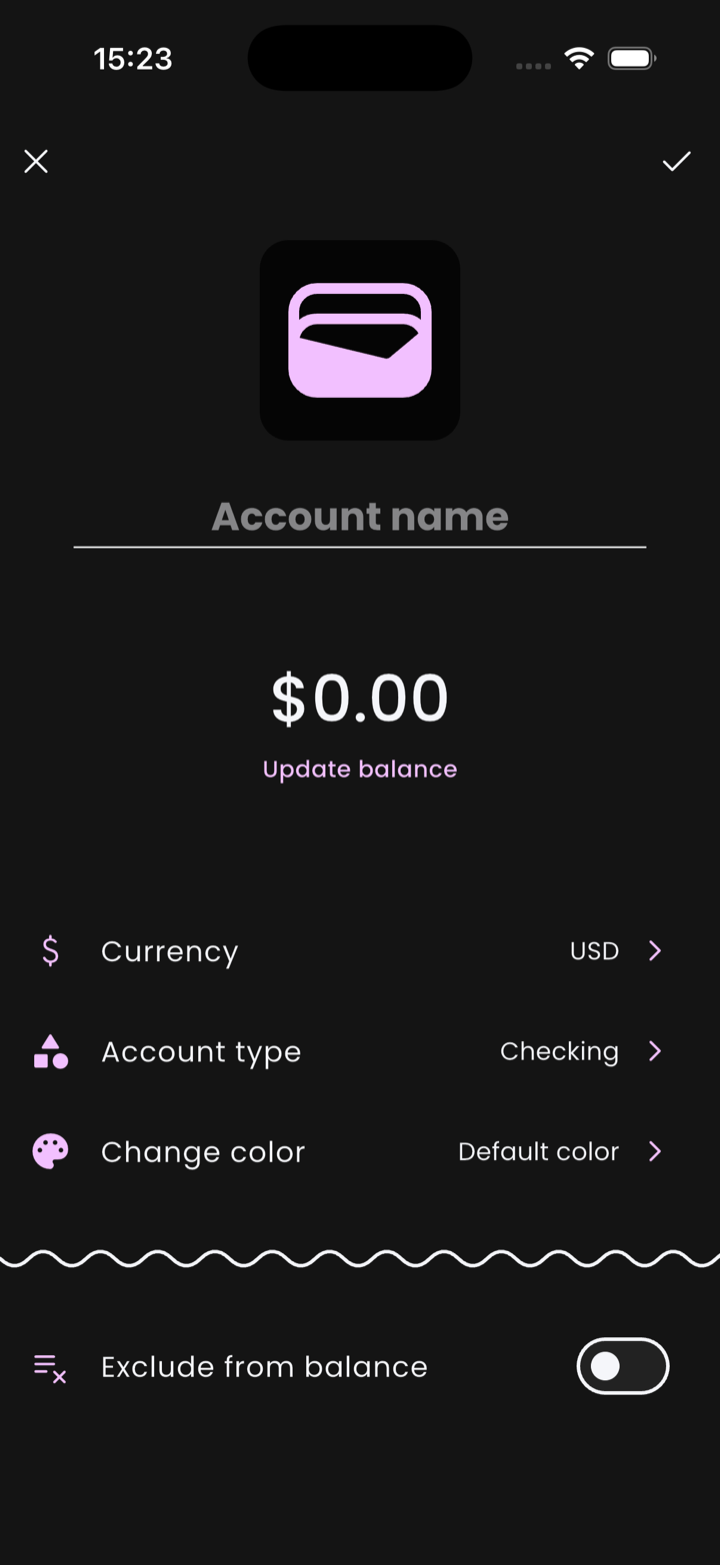
- Open the Accounts tab and tap the + button.
- Type an Account name. Tap the wallet icon above to pick a different one.
- Tap Update balance to set today's balance — leave at $0.00 if you'd rather start fresh.
- Set the Currency, Account type, and (optionally) Change color.
- Tap the ✓ at the top right to save.
2. There is no "current balance" field
An account's balance isn't a number Flow stores anywhere — it's the running sum of every transaction in that account. There's nothing to keep in sync because there's nothing to drift.
That's why Update balance doesn't ask "what is the new balance" and overwrite a field. Instead, you enter what the balance should be, Flow computes the difference between that target and the current running sum, and inserts a single income or expense transaction for the delta. The books still add up afterwards.
💡 Add what you have today
3. Re-syncing after drift
Real life drifts: ATM withdrawals you forgot, fees, rounding. To resync an account without recreating it, open the account and tap Update balance again. Same mechanism — Flow inserts the corrective transaction for whatever the difference is, and you can choose the date the correction lands on.
Multi-currency
Each account holds one currency. If you keep money in MNT, USD, and EUR, you create three accounts. Flow stores transactions in the account's native currency and converts to your primary currency on the fly for reports.
ℹ️ Exchange rates
Transfers
Moving money between two of your accounts isn't an expense — it's a transfer. Flow has a dedicated transaction type for this so transfers don't pollute your spending reports. See Recording transactions for the full flow.
Excluding from total balance
On the edit page, toggle Exclude from balance if an account shouldn't roll up into your home screen total — useful for shared accounts, business accounts, or test accounts.
Archiving an account
Closing an account in real life? Set its balance to zero (transferring out the remainder if needed), then archive it. Archived accounts hide from picker lists but keep their history intact for reports.